Knowing how fast your phone is charging can help you avoid slow chargers, faulty cables, and unnecessary battery wear. If you’ve ever plugged in your phone and wondered whether it’s actually fast-charging or just trickling power, you’re not alone. Fortunately, there are simple ways to check your phone’s charging speed easily without needing advanced technical knowledge.
In this guide, you’ll learn how to check your phone’s charging speed using built-in system indicators, third-party apps, and charger specifications on both Android and iPhone devices. Whether you want to confirm fast charging is working properly or troubleshoot slow charging issues, these methods will give you clear, accurate results in minutes.
By the end of this article, you’ll know exactly how to measure your phone’s charging speed and make sure you’re getting the fastest and safest charge possible every time.
Understanding the charging speed of your smartphone can help you optimize battery life and maintain its health. While some devices support fast charging at impressive rates, actual charging speeds may vary based on several factors, including temperature management and battery health preservation. Here are some effective methods to view your phone’s charging speed.
1. Using the Charge Meter App
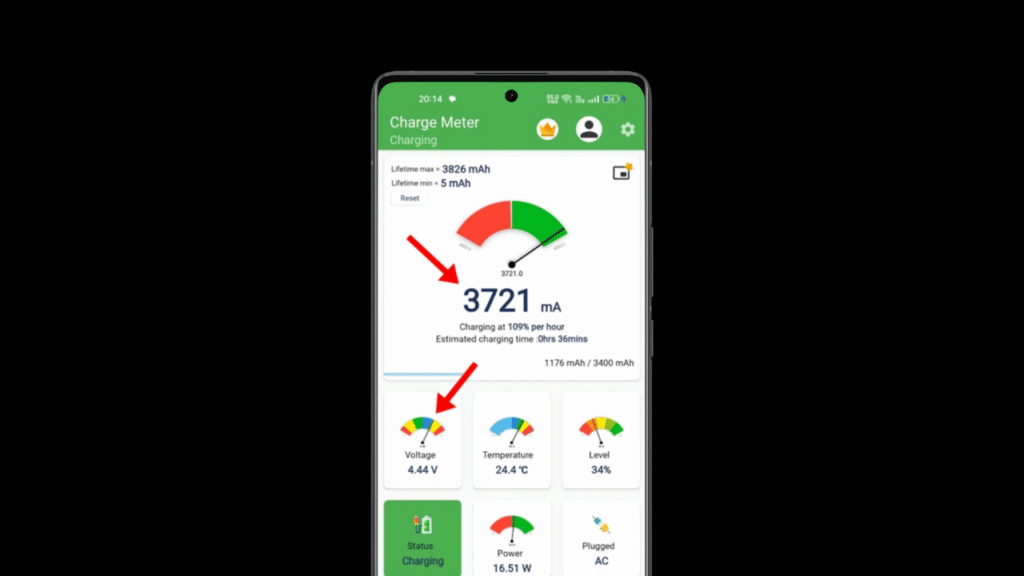
One of the easiest ways to monitor your phone’s charging speed is through the Charge Meter app. This application provides real-time data on how fast your device is charging.
Steps to Use Charge Meter:
Installation: Download and install the Charge Meter app from your app store.
Launch the App: Open the app and connect your phone to its charger.
Calculate Speed: The app will display the current charging rate in milliamps (mA). To find the charging speed in milliwatts (mW), multiply this figure by the voltage (usually 5V for standard chargers).
Convert to Watts: Divide the result by 1,000 to convert milliwatts to watts (W).
Using this method may require some manual calculations, but it can provide accurate results.
2. Checking Charging Speed with AmpereFlow
Another user-friendly application for monitoring charging speed is AmpereFlow. This tool simplifies the process and provides quick data.
Steps to Use AmpereFlow:
Install the App: Download and install the AmpereFlow app from your app store.
Start Monitoring: Open the app and tap on the ‘Start’ button.
Grant Permissions: Allow the app to display information over other applications.
Connect Your Charger: Plug in your charger while the phone is locked; the charging speed will appear on the screen.
AmpereFlow offers a straightforward way to track your charging rates with minimal intervention.
3. Utilizing a USB Power Meter
For those who prefer a hardware solution, a USB power meter can provide accurate readings of your phone’s charging speed. These devices are especially useful for diagnosing charging issues.
Steps to Use a USB Power Meter:
Purchase a USB Power Tester: Acquire a USB Type-C power meter.
Connect: Plug it into your phone’s charging port, ensuring you also connect your charging cable to the meter.
Read the Display: The device will show real-time charging speed in watts.
This method provides immediate and precise information about the charging process without requiring software.
Read also : How to Fake GPS Location on Android (Easy & Safe Method)
Conclusion
Understanding how to monitor your phone’s charging speed can enhance battery longevity and performance. Whether you opt for an application like Charge Meter or AmpereFlow or choose a dedicated USB power meter, each method offers unique benefits for checking charging rates. Take advantage of these tools to ensure your device remains in optimal condition.