Google Photos floating bar on iOS brings fresh design and usability improvements, making photo management smoother and more intuitive for users.
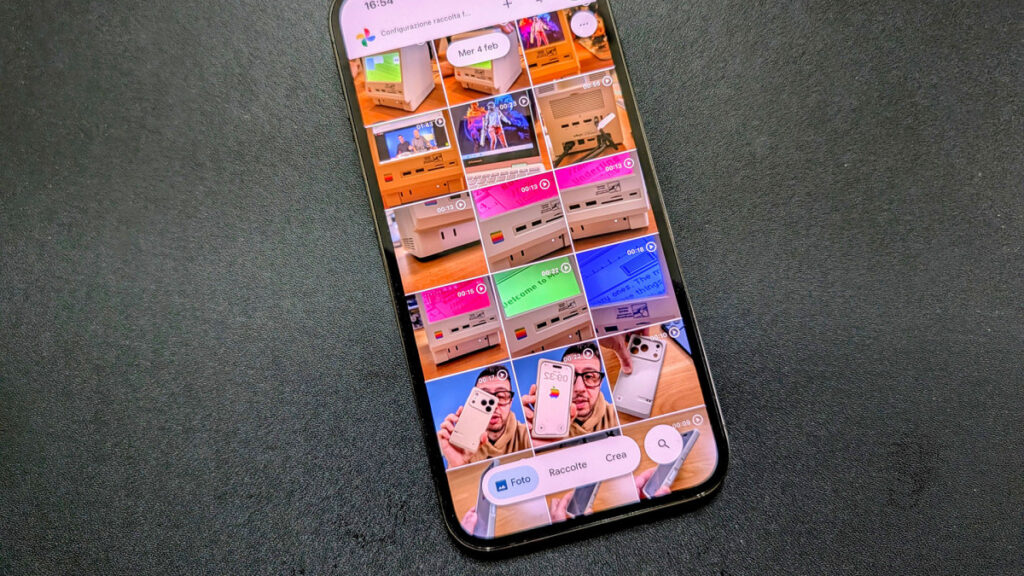
Google Photos floating bar on iOS brings fresh design and usability improvements, making photo management smoother and more intuitive for users. The latest update from Google introduces a sleek floating bar interface on the iPhone app, signaling a considerable shift in user experience and interface design.
Tech enthusiasts and everyday users alike are buzzing about the Google Photos floating bar update because it offers a new way to navigate and interact with photos. Google has traditionally focused on simplicity and smart features, but this floating bar marks a significant UI overhaul, aiming to improve accessibility without compromising screen space. With millions relying on Google Photos to manage their memories, these changes matter and will impact day-to-day photo handling for iOS users.
Google Photos floating bar: a fresh UI innovation for iOS
The centerpiece of this design update is the new floating bar, which replaces the traditional static navigation controls. Positioned conveniently at the bottom of the screen, the floating bar enables quick access to crucial photo management features like sharing, editing, and deleting, all within reach of your thumb. This relocation allows smoother, more ergonomic interaction, especially on larger iPhone models.
Unlike the previous layout where controls occupied a fixed bottom strip, the floating bar floats subtly above the content. Google’s design team carefully balanced visibility and minimal screen disruption, offering users instant access to useful tools without obscuring their photo gallery. The new bar also boasts refined icons and subtle animations, enhancing the overall aesthetic while adhering to modern design principles.
Incorporating Google’s Material You design philosophy, the floating bar aligns with the evolving guidelines of Material 3, emphasizing dynamic, adaptive UI elements that feel natural and responsive across devices. This update highlights Google’s commitment to melding functionality with seamless visual experiences.
Benefits of the Google Photos floating bar for iOS users
This UI shift brings significant benefits for users looking for a more intuitive and efficient way to interact with their photo libraries. Here’s what you can expect:
Enhanced Ease of Use: The floating bar’s thumb-friendly placement helps users manage photos faster, requiring fewer taps and less hand movement.
Cleaner Interface: By floating above content rather than taking up fixed space, the app feels less cluttered, focusing more on your pictures.
Consistency with System UI: Integration with iOS gestures and controls makes the app feel more native, reducing adjustment time.
Creative Uses by Google: Beyond simple navigation, Google leverages the floating bar to prioritize creative tools, making editing and sharing more accessible and encouraging users to engage more deeply with their memories.
Google’s progressive rollout means that iOS users should expect to receive this update gradually, making it a fresh talking point across social platforms and tech forums. Early adopters praise the floating bar’s responsiveness and the thoughtful balance between innovation and usability.
Read also : iPhone 17e features: Apple Intelligence Meets Affordable Innovation
In summary, the Google Photos floating bar update on iOS is a well-crafted improvement that elevates photo management. By combining ergonomic placement, modern design cues, and enhanced functionality, Google ensures the app remains competitive and user-friendly in the evolving mobile landscape. Whether you’re a casual snapshot lover or a serious photo organizer, this clean and responsive interface refresh is designed to make your experience simpler and more engaging. Keep an eye out for the update on the App Store and unlock more streamlined photo interactions on your iPhone.